Archive
FreeBSD 8.x and 4K sector disks
FreeBSD 8.x and 4K sector drives
FreeBSD 8.x (and older) use sysinstall as the install mechanism and fdisk for disk slicing/partitioning. Unfortunately, these utilities perform calculations based on a 512B sector size. This causes problems with drives of a sector size greater than this. 4K sector size drives are the most popular at this point.
I cannot explain the problem and solutions any better than Ivan Voras (FreeBSD source contributor since 2008), so I link to his blog here.
There are good tidbits of information in the comments such as sysinstall not understanding gpart, etc. It would be a good idea to read through the comments as well.
FreeBSD + Dell 12G + X520-DA2 10G NIC
Intel 82599 based NICs on Dell 12G Servers w/ FreeBSD?
Dell offers the X520-DA2 10G Fiber NIC based on the Intel 82599 chipset for it’s 12G line of servers. It seems that there were two batches of this NIC manufactured. One batch was Dell branded, the other Intel branded.
According to this post, the FreeBSD source appears to be missing PCI ID’s etc that would enable the Dell branded card to work under FreeBSD on it’s 12G servers resulting in the card not being recognized by the OS. Inspection of dmesg shows that there is an ethernet card with no driver attached.
This is currently being corrected in HEAD, but for the time being swapping in an Intel branded equivalent which is seen by FreeBSD without a problem is sufficient. Unfortunately, the Dell BIOS does not recognize the card. having said that, the card is recognized in the OS and does work using the ixgbe(4) driver. The interface name begins with “ix”.
FreeBSD on HP Proliant DL360p G8 Servers
The Problem
Our provisioning platform utilizes a traditional PXE method with Linux and FreeBSD integrated. On my first attempt to PXE boot and install FreeBSD, the kernel panic’d when the network interface was brought up within sysinstall.
Turns out that the neither the BCM5719 nor BCM5720 ethernet controllers are fully supported in FreeBSD 8-STABLE as of this writing. However, the FreeBSD community is currently working on resolving this.
The Hardware
We were testing FreeBSD 8-STABLE (as of 21 May 2012) on the following configuration:
HP Proliant DL360p G8 w/ Smart Array i420 RAID Controller
128GB RAM
Eight (8) 2.5″ 300GB SAS HDD

The Resolution
FreeBSD also supports the HP NC361T/Intel i350T2, both based on the Intel i350 controller. The downside with using a PCIe NIC is that a slot is removed as an expansion option.
FreeBSD’s Package Index
Interpreting the package INDEX
Author: Devin Teske
Date: 1 Jan 2006
Last modified: 24 Feb 2006
Purpose
This file documents the file format of the /packages/INDEX file located on FreeBSD installation CD-ROMs and conveys what it is used for (and its importance).
The layout of this document is as follows:
- Foreword
- The INDEX File
- The FreeBSD INDEX File Format
- FreeBSD-5.2 and FreeBSD-4.10 or Lower
- FreeBSD-5.3 and FreeBSD-4.11 or Higher
- FreeBSD-6.0 or Higher
- Field Definitions
- Field Population
- References
Foreword
Common between each version, is that each line (delimited by the new-line character) corresponds to a single package (found in packages/All). It is possible to have additional fields beyond the last field (for custom purposes) as they will be ignored by sysinstall.
The INDEX File
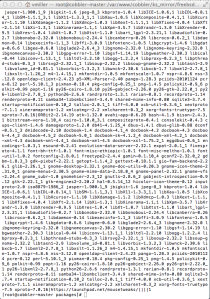
If sysinstall is scripted, then the interactive menu may or may not be invoked (if not, then the categories/description fields may be omitted).
When sysinstall is in the process of installing the packages, it first makes sure that all the run-dependencies (listed in the INDEX file for that package) are installed. If a package that is listed in the `run-deps’ field is not installed, sysinstall installs it before installing the requested package. After installing any dependent packages (recursively), sysinstall then unpacks the requested package and reads its packing-list (the `+CONTENTS’ file within the package tarball). All package dependencies listed inside the package’s packing-list MUST be installed before-hand or else sysinstall will generate an error. Therefore, all package dependencies that appear in the packing list MUST be present in the `run-deps’ field of the INDEX file. There reverse is not true, however. A dependency may appear in the INDEX file and not in the package’s packing-list.
INDEX File Format
FreeBSD-5.2 and FreeBSD-4.10 or Lower
package|port-origin|install-prefix|comment|port-desc-file|maintainer|categories|build-deps|run-deps|www-site
FreeBSD-5.3 and FreeBSD-4.11 or Higher
package|port-origin|install-prefix|comment|port-desc-file|maintainer|categories|build-deps|run-deps|www-site|unknown|unknown|unknown
I have never seen the 11th, 12th, or 13th field populated. So their purpose remains unknown.
FreeBSD-6.0 or Higher
package|port-origin|install-prefix|comment|port-desc-file|maintainer|categories|build-deps|run-deps|www-site|unknown|unknown|unknown|disc
Field Definitions
| Field | Comments |
| package | This is the name of the package. This should be the name of the file as it appears in packages/All without the .tgz suffix. This value is used for finding the package tarball and is also displayed in the left-hand column of the interactive package selection menu of sysinstall. |
| port-origin | The package origin (as a qualified pathname). Basically, this is the origin of the package with a /usr/ports/ prefix. Even if you do not install the Ports Collection (which installs Makefiles and other information), this should be populated respectively. |
| install-prefix | The base directory where the package will install it’s files to. For example, if the package installs files into /usr/local/bin and /usr/local/sbin then the install-prefix would be /usr/local. This is an informational value (the package’s packing-list takes precedence). |
| comment | This is the one-line comment for the package. This should be the same as the contents of the +COMMENT file located within the package tarball. This value is displayed in the right-hand column of the interactive package selection menu of sysinstall. |
| desc-file | When you install the Ports Collection the /usr/ports directory is populated with Makefiles and other information. This value should be the path to the description file for the package. This is only used when you install the FreeBSD Ports Collection. |
| maintainer | The e-mail address of the package maintainer. |
| categories | Within the /packages directory of the CD-ROM, you will find (besides the INDEX file) several directories. The actual package should always reside in theAll directory (as this is where sysinstall looks for it). However, finding the package you want/need can become quite cumbersome if you have to sift through every package in one directory. To ease the process of finding a specific package, you can populate this field with several categories (sub-directories) that the package can be found in.
When sysinstall’s interactive package selection menu is invoked (either by a script or simply interactively) it allows a user to browse several categories to find a specific package. This field dictates to sysinstall which categories (delimited by a space) the package is available in. When you specify a category (sub-directory), the simplest (and most efficient) thing to do is, create a symbolic link in the category directory (in /packages) pointing to the actual package (in /packages/All). |
| build-deps | These are the dependencies (names of packages delimited by a space) that this package requires to bebuilt. This is used if you install the FreeBSD Ports Collection. |
| run-deps | These are the dependencies (names of packages delimited by a space) that this package requires to run. Any package listed here will be installed by sysinstall before the package is even attempted to be installed. See section 2 paragraph 3 for more information. |
| www-site | Either the website URL of where the package can be obtained, the package maintainer, or the website URL of the item that the package installs. |
| unknown | If a field has been marked `unknown’ in section 3, it is because I have never seen it populated and thus never used. These fields can be left empty without any recourse. |
| disc | The disc that the package can be found on (in a multi-disc distribution of the FreeBSD installation). This is a new feature of FreeBSD-6.0 Other distributions (such as FreeBSD-4.8 and FreeBSD-4.11 do not list packages in the INDEX file unless it appears on the same CD-ROM). |
Field Population
- package: file_name without `.tgz’ suffix
- port-path: echo /usr/ports/`pkg_info -qo file`
- install-prefix: pkg_info -qp file | head -n1 | sed -e ‘s/^@cwd //’
- comment: pkg_info -qI file
- desc-file: echo /usr/ports/`pkg_info -qo file`/pkg-descr
- maintainer: echo ports@FreeBSD.org
- categories: find . -type l -name FILE | sed -e ‘s/^\.\/\(.*\)\/[^\/]*$/\1/’ | tr ‘\n’ ‘ ‘
- build-deps: pkg_info -qr file | sed -e ‘s/^@pkgdep //’ | tr ‘\n’ ‘ ‘
- run-deps: pkg_info -qr file | sed -e ‘s/^@pkgdep //’ | tr ‘\n’ ‘ ‘
- www-site: pkg_info -qd file | grep ‘^WWW: ‘ | sed -e ‘s/^WWW: //’
- disc: the disc that the package resides on
References
FreeBSD on Dell PowerEdge 12G Servers
The Problem
We received a number of the new Dell PowerEdge 12G servers and were excited to give them a try. We quickly found a scenario identical to the issue Wayfair Engineering discovered. The issue was that despite the hardware notes stating the LSI Logic SAS2208 chipset was supported (by an odd driver given past precedent) the installation DVD failed to recognize the controller and therefore failed to install FreeBSD.
The Hardware
We were testing FreeBSD 8.3-RELEASE on the following configuration:
Dell PowerEdge R620 w/ H710 RAID Controller
128GB RAM
Eight (8) 2.5″ 500GB SAS HDD

The Resolution
Upon discovery of this issue, I was on the path to resolve it within our environment in the same manner that Wayfair Engineering had done. The difference was that we would be working with stable/8 vs. stable/9.
While working on this approach, we were able to come into contact with FreeBSD contributor Sean Bruno. Sean indicated to us that the mfi driver changes had been committed to stable/8 on 18 May 2012, the week we had attempted to get FreeBSD to install on the R620. You can see the details of this commit here. Obviously, with this commit, it eliminated the need to download the MFI head project that Wayfair Engineering had to download to get it to work.
The mfi commit was done for stable/7, 8, and 9 on 18 May 2012. Therefore, if you are installing FreeBSD on your Dell PowerEdge 12G servers, you should be running one of those versions or a production release with that code.
The Process
# csup stable-supfile
# cd /usr/src/
# make buildworld
# cd /usr/src/release
# make release
You’ll want various environment variables set when you execute `make release` such as CHROOTDIR, CVSROOT, and BUILDNAME. You may also perhaps want to set MAKE_DVD, NO_FLOPPIES, NODOC, etc. Check the release(7) manpage for more information.
ISO files will be stored in $CHROOTDIR/R/cdrom/. Use `mkisofs` from cdrtools to generate your ISO image and burn it to CD/DVD using your favorite burner and software.
My environment variables were set as follows when I built the release:
CHROOTDIR=/usr/release
BUILDNAME=8.0-STABLE
CVSROOT=/usr/cvs
EXTPORTSDIR=/usr/ports
EXTSRCDIR=/usr/src
MAKE_DVD=YES
NO_FLOPPIES=Yes
NODOC=YES
Using sysinstall for automated FreeBSD 8.x installs
First, allow me to point out that as of FreeBSD 9 sysinstall is no longer the default install mechanism. Therefore, this post addresses versions previous to FreeBSD 9.
Summary
It’s important to understand that our provisioning platform is Cobbler. Therefore, you may find references to Cobbler in this post. There may need to be code modifications to permit these concepts to work within other platforms.
This set of config files and scripts allows us to more dynamically control host builds by scripting much of the process and hosting an answer file remotely. Doing so helps us avoid the need of creating multiple mfsroot files for varying profiles, etc.
Out of the box, sysinstall does not support pure HTTP installs. To enable full HTTP support, one of my former colleagues wrote a patch which was applied to the sysinstall source and compiled. This new binary was put into the mfsroot file.
mfsroot.gz
The mfsroot.gz is a BSD UFS filesystem environment that contains config files, scripts, and binaries necessary to complete a FreeBSD 8.x install. This file is retrieved by the PXE boot file and loads it into memory. The procedure described below takes the contents of an mfsroot.gz from the FreeBSD DVD install media and adds the files described later in this post to that file.
The mfsroot contained within the vendor install media is setup to run sysinstall. It can be
modified in various ways to manipulate the FreeBSD install.
Prerequisites
- mfsroot file: This file can be found on the vendor media. Just copy it
locally. - A FreeBSD host: This host is where you will perform these procedures.
- The FreeBSD host should have bash installed and when executing this
procedure, it is the current shell
Procedure
Modifying the mfsroot involves changes to the existing file to change the behavior of the environment. Some common files modified are the loader.rc and loader.conf files. When adding new files to the mfsroot, such as a newly compiled boot_crunch file, it will require creating a new mfsroot file. This section will describe both methods of modifying the mfsroot.
Modifying Existing mfsroot
To modify an existing mfsroot all that needs to be done is to create a memdisk device and mount it. Once mounted, you can modify the mfsroot simply by cd’ing into the new mount point and making your desired changes. We assume the memdisk device is md0 and the mount point is /mnt.
To create this memdisk and mount it, one only need to run the following:
# mdconfig -f $path_to_mfsroot
# mount /dev/md0 /mnt
Once changes have been made to the mfsroot, you can dismount and remove the memdisk device by executing the following:
# umount /mnt mdconfig -d -u 0
# mdconfig -d -u 0
Creating New mfsroot from Existing mfsroot
When adding files to an mfsroot, such as the boot_crunch, will require a new, larger mfsroot. This procedure discussed how to accomplish this.
This procedure assumes the following:
- we are adding a boot_crunch file
- Resulting mfsroot will need to be 12MB.
- Existing mfsroot mount point will be /tmp/mfsroot_old
- New mfsroot mount point will be /tmp/mfsroot_new
- Existing mfsroot is /tmp/mfsroot_old
- Memdisk device for the existing mfsroot is md0
- Memdisk device for the new mfsroot is md1
- New boot_crunch file is /tmp/bootcrunch/boot_crunch
# mkdir /tmp/mfsroot_old /tmp/mfsroot_new
# dd if=/dev/zero of=/tmp/mfsroot bs=1024 count=12288
# mdconfig -f /tmp/mfsroot_old; mdconfig -f /tmp/mfsroot
# newfs /dev/md1
# mount /dev/md0 /tmp/mfsroot_old; mount /dev/md1 /tmp/mfsroot_new
# cd /tmp/mfsroot_old; tar -cf - . | (cd/tmp/mfsroot_new; tar -xf -)
# cp /tmp/bootcrunch/boot_crunch /tmp/mfsroot_new/stand/
# cd /tmp/mfsroot_new/stand
# for i in $(./boot_crunch 2>&1|grep -v usage); do
    if [ "$i" != "boot_crunch" ]; then
      rm -f ./"$i"; ln ./boot_crunch "$i";
    fi
  done
# cd /; umount /tmp/mfsroot_old; umount /tmp/mfsroot_new
# mdconfig -d -u 0; mdconfig -d -u 1
At the completion of this procedure, /tmp/mfsroot will be the new mfsroot. Replace the old mfsroot with this one.
install.cfg
The install.cfg file is sysinstall’s config file. When sysinstall is executed it checks for the existence of this file. If the file does not exist, it runs interactively else it executes the file and performs the operations contained within it. This file exists in stand/ inside of the mfsroot file.
The syntax of the file is archaic and strict, but can be quite powerful if you spend the time to learn it. That is a moot point now though since sysinstall is deprecated in more recent versions of FreeBSD.
The file below simply sets up the environment where sysinstall will run, then executes a script called doconfig.sh which is described below.
# Turn on extra debugging.
debug=YES

# Turn off all prompting.
nonInteractive=YES
noWarn=YES

command=/bin/sh /stand/doconfig.sh
system
# Chain to the config we just downloaded
configFile=/stand/cobbler.cfg
loadConfig
doconfig.sh
This script, also in stand/ inside the mfsroot file, is the workhorse. It completes the setup of the environment by setting variables and communicating with the remote server to grab the remainder of the install.cfg file which we see is referred to as stand/cobbler.cfg. We describe this later in the post.
#!/bin/sh

server=`kenv -q boot.nfsroot.server`
mac=`kenv -q boot.netif.hwaddr`
ip=`kenv -q boot.netif.ip`
nm=`kenv -q boot.netif.netmask`
gw=`kenv -q boot.netif.gateway`
name=`kenv -q dhcp.host-name`
route=`kenv -q dhcp.routers`

# Returns true if a given network interface has the specified MAC address.
macmatch()
{
  local addr

  addr=`ifconfig $1 | grep ether | awk -F" " '{ print $2 }'`
  [ "$addr" = "$2" ]
  return $?
}

for ifn in `ifconfig -l`; do
  case $ifn in
    *)
      if macmatch $ifn $mac; then
        iface=$ifn
      fi
    ;;
  esac
done

# Bring up the interface so we can fetch the remote install.cfg file.  Confuses sysinstall, so
# bring it back down after fetching install.cfg.  Kinda assuming we're on the same subnet
# as the server, otherwise won't work.
ifconfig "$iface" "$ip" netmask "$nm"
sleep 5
route add default $gw

# Use Fetch to get my answer file from my cobbler/remote server.  Use awk to pull out different
# sections using "% /path/to/file" syntax.
fetch -qo - "http://$server/cblr/svc/op/ks/system/$name" |
	awk '/^% /{f=$2} /^[^%]/ && f{print > f}'

# Bringing down the interface
ifconfig $iface down
route delete default $gw

# Setup our media.  This file is loaded by sysinstall after it retrieves the install.cfg from the
# cobbler/remote server.
cat > /stand/media.cfg <<EOF
netDev=${iface}
defaultrouter=${route}
ipaddr=${ip}
netmask=${nm}
_httpPath=http://${server}/cobbler/ks_mirror/freebsd82-x86_64
mediaSetHTTP
EOF
cobbler.cfg
The cobbler.cfg is hosted on a remote server and is fetched via HTTP. It can be separated into sections that are executed as shell scripts to enable more dynamic control over the configuration. The doconfig.sh script above separates the sections of the files based on “% $filename” syntax.
The $disk variables below are substituted with the actual disk identifier. You can find that using the install.disk kernel variable.
% /stand/cobbler.cfg
# The installation media is setup in the doconfig.sh script
hostname=$system_name
configFile=/stand/media.cfg
loadConfig

# Select which distributions we want.
dists=base kernels GENERIC SMP doc catpages
distSetCustom

# Figure out the disk configuration
disk=${disk}
partition=all
bootManager=standard
diskPartitionEditor
${disk}s1-1=ufs 12582912 / # 6 GB root
${disk}s1-2=swap ${swap} none # swap
${disk}s1-3=ufs 2097152 /tmp 1 # tmp
${disk}s1-4=ufs 4194304 /var 1 # 2 GB var
${disk}s1-5=ufs 4194304 /home 1 # 2 GB home

# OK, everything is set.  Do it!
installCommit

package=perl
packageAdd

shutdown
PXE Booting Into A FreeBSD Installation
NOTE: This post is old. For our new installation method, see the article on Installing FreeBSD via Cobbler.
In the modern day, technologies for provisioning OS installations has progressed to a point where network installs are the standard thus eliminating the need for physical media and even physical access to the asset (apart from it’s physical installation in a cabinet). Networked consoles enable system builds in place.
Installing via PXE requires three services…DHCP, TFTP, and FTP or HTTP. For the purposes of this post, we use ISC DHCP and the system TFTP daemon. It is assumed that your FTP and/or HTTP servers are already configured appropriately.
The environment I installed in included Cobbler, a linux build system that has been modified by some of my colleagues to support FreeBSD. Cobbler utilizes pxelinux as the PXE loader, therefore, my scenario included chaining Grub2pxe to pxelinux. I have not tested without pxelinux, but I assume that Grub2pxe will work find without pxelinux. Since we do employ Cobbler, my post will include the pxelinux configuration, but I will keep the information generic.
DHCP Configuration
An example of the dhcpd.conf file:
subnet 192.168.1.0 netmask 255.255.255.0 {
   option routers             192.168.1.1;
   option ntp-servers 192.168.1.1;
   option domain-name-servers 192.168.1.2, 192.168.1.3;
   option subnet-mask         255.255.255.0;
   pool {
      range 192.168.1.100 192.168.1.200;
   }
   filename                   "/pxelinux.0";
   default-lease-time         21600;
   max-lease-time             43200;
   next-server                192.168.1.5;
}
TFTP Configuration
An example of /tftpboot/pxelinux.cfg/default file:
LABEL bsdpxegrub
   kernel /tftpboot/pxegrub.0
   MENU LABEL bsdpxegrub
   append initrd=/tftpboot/pxegrub.0  locale=  text
   ipappend 2
Most of the above configuration is superfluous, but does not cause any issues with the FreeBSD install.
Grub2pxe Configuration
The files and directories of interest here are:
- /tftpboot/pxegrub.0 (The PXE executable)
- /tftpboot/boot/grub/ (The default Grub directory)
- /tftpboot/boot/grub/grub.cfg (The default Grub config file)
- /tftpboot/boot/grub/i386-pc/* (All of Grub’s modules)
Once Grub is installed, grub-mknetdir will put everything into place including running grub-mkimage which generates the pxegrub.0 file. An example of the command is as follows:
grub-mknetdir –net-directory=/tftpboot –grub-mkimage=pxegrub.0
What you see below for the /tftpboot/boot/grub/grub.cfg, is a complete config for our environment. Other implementations may not need the config that we have generated. Many of the kernel environment variables below are used in our mfsroot.gz file. For a minimal working environment, all the lines up to and including the vfs.root.mountfrom kernel variable are necessary.
menuentry $arbitrary_profile_name {
   echo -e "Fetching the kernel and UFS root...\c"
   kfreebsd $kernel_path
   kfreebsd_loadenv /boot/device.hints
   kfreebsd_module $initrd_path type=mfs_root

   set kFreeBSD.vfs.root.mountfrom=ufs:/dev/md0c
   set kFreeBSD.boot.nfsroot.server=$pxe_default_server
   set kFreeBSD.boot.netif.hwaddr=$net_pxe_mac
   set kFreeBSD.boot.netif.ip=$net_pxe_ip
   set kFreeBSD.boot.netif.netmask=255.255.255.0
   set kFreeBSD.boot.netif.gateway=$system_gateway
   set kFreeBSD.dhcp.host-name=$net_pxe_hostname
   set kFreeBSD.dhcp.routers=$system_gateway
   set kFreeBSD.boot.kspath=$ks_path
   echo "Done!"
   sleep 2
}
HTTP/FTP Configuration
Pure HTTP installs are not supported by sysinstall. A former colleague wrote an HTTP module for sysinstall that we compiled into the binary that is placed inside the mfsroot.gz. This patch was contributed back to the community, but was not committed to the FreeBSD sources due to the migration away from sysinstall in FreeBSD 9.0.
 hostileadmin